My Mac Kept Killing My Agents, So I Built Agent Session Pilot
You give Claude Code a 20-minute refactor. You close your MacBook and go get a coffee. You come back, open the lid, and the agent is where you left it: stopped halfway, nothing finished.
On December 28, 2025, I wrote a small script to fix that. Ten months and 58 releases later, that script is how I run all my agents, and as of today it has a new name: Agent Session Pilot. The acronym stays ASP, the command stays asp. You may have seen it as Agents Sleep Preventer, or before that, Claude Sleep Preventer.
Here is what it does, how it works, and why the old name had to go.
Why caffeinate isn't enough
The first answer everyone gives is caffeinate. Claude Code already runs it: look at ps while it works and you'll find caffeinate -i -t 300 under the claude process. That stops idle sleep. Close the lid and the Mac sleeps anyway.
What holds with the lid closed is this:
sudo pmset -a disablesleep 1
# and later, without fail:
sudo pmset -a disablesleep 0
disablesleep isn't even in man pmset. I tried to live without it: for two months I used Apple's proper API, IOPMAssertion, then went back to pmset in March because it was more reliable with the lid closed.
The command is the easy part. The flag is global and stays on until something turns it off, so the real work is turning it off at the right moment, every time. Miss that and your Mac stays on in your bag.
Hooks decide when
Claude Code and Codex both have lifecycle hooks, and ASP plugs into them. On Claude Code:
UserPromptSubmit  ->  asp start        session working, sleep off
PreToolUse        ->  asp refresh      still alive
PostToolUse       ->  asp refresh
PreCompact        ->  asp refresh
SubagentStart     ->  asp refresh
SubagentStop      ->  asp refresh
Stop              ->  asp stop         last one out gives sleep back
StopFailure       ->  asp interrupted  network or API error
Notification      ->  asp attention    the agent needs you
Two cases make this harder than it looks:
- The turn ends but the work doesn't.
Stopfires at the end of a turn even when subagents or background commands are still running. Soasp stopchecks the agent's process tree and keeps the Mac awake while it's busy. - The hook never comes. After a Ctrl+C or a crash there's no
Stop. A session with no hook for 30 seconds and a quiet process tree gets dropped, so a dead agent can't hold your Mac awake.
When the last agent finishes with the lid closed, no external display and nobody around, the Mac goes to sleep right away. A docked MacBook is left alone: that rule exists because one fell asleep mid-typing (#6).
Hooks also have to be fast. Claude Code runs them before and after every tool call, and waits. On a busy Mac they took 0.4 to 1.1 seconds each, because they spawned ps and pmset. They now read processes through libproc and the power state through IOKit, and take 20 to 60 ms.
Everything else came from something going wrong
Keeping the Mac awake fixed the first problem and exposed the next ones.
The network drops. On a train, a turn ends on a network error and the agent sits there until you type "continue". ASP keeps the Mac awake for up to 30 minutes, waits until the API has answered for 20 seconds in a row, then types the prompt into that terminal (iTerm2, Terminal or tmux). It gives up after 3 tries, never touches usage-limit, login or billing errors, and waits if you're typing there.
Agents don't know when to stop. Some poll every few minutes for hours, and your Mac stays up all night for nothing. So you can set a deadline (asp force when-done --within 1h30) or a bedtime (asp bedtime 2:00). On battery at 10% or less, agents no longer keep the Mac awake, and sleep also comes back if it overheats.
A session eats the machine. Open enough sessions and one of them will take all your RAM or fill your disk. ASP tells you which one: a process tree over 8 GB, memory pressure, swap, a disk almost full or emptying fast. It measures phys_footprint, because RSS misses compressed memory, and it never kills anything. If the session is listening on Telegram, the alert lands in its inbox and it can clean up after itself. asp monitor status shows the RAM of each session.
You walk away. asp telegram setup connects your own bot, and /telegram in a session makes it listen. One bot serves every session: a message finds its session through its topic, a name: prefix, a reply, or buttons. Voice notes are transcribed on your machine (a 6 min 20 note took 17 seconds on my Mac). A project group can even let a client talk to the session working on their project, under strict rules. Your messages go straight to the Telegram API with no server of mine in the middle, which also means Telegram sees them: bot chats aren't end-to-end encrypted.
You reopen the same sessions every day. asp workshop opens your named sessions in iTerm or tmux, resumes each one by ID, answers the startup questions and types your first prompts.
You'd rather talk. Hold Fn+Shift, speak, release. Dictation runs locally with Whisper or Parakeet v3, and a vocabulary list keeps "Cleemo" from coming out as "Climo".
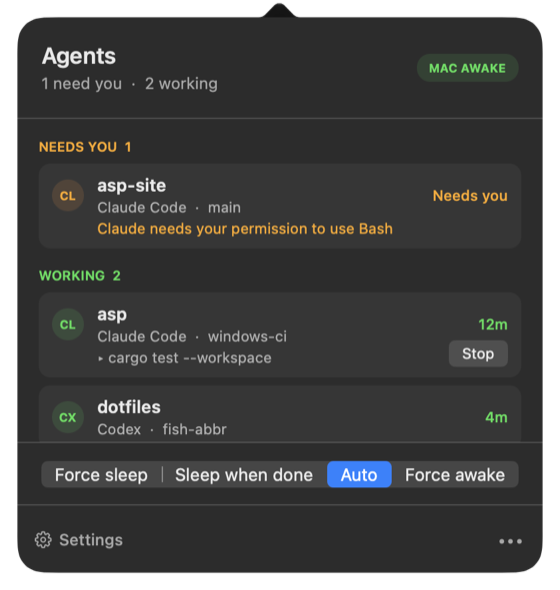
The menu bar ties it together: every session grouped by project and branch, who's working, who needs you and why, what's still running in the background with a Stop button, and a click to jump to the right terminal.
Why the name had to go
It had already changed once: Claude Sleep Preventer became Agents Sleep Preventer when Codex support landed.
Then someone opened an issue titled "Why does this project do speech-to-text?". Fair question. After that came Linux server mode: Telegram, RAM and disk watch, the workshop, and no sleep prevention at all, because that machine never sleeps. A Sleep Preventer that doesn't prevent sleep was one joke too many.
Only the display name changes. The bundle ID, AgentsSleepPreventer.app, the DMG, the GitHub repo and the Homebrew cask keep the old name on purpose: macOS ties permissions to the bundle ID, and existing installs have to keep finding their updates. If you already have it installed, there's nothing to do.
What you're trusting it with
A tool like this gets real access, so here's the list:
- A sudoers rule that allows four exact
pmsetcommands and nothing else. You type your admin password once, at setup. - Hooks merged into your Claude Code and Codex config. Your own hooks stay untouched.
- Microphone and Accessibility permissions, for dictation. Audio is transcribed locally and never leaves your machine.
- Signed and notarized macOS builds, with signed Sparkle updates. The Windows ZIP is unsigned for now.
Someone who says they don't easily trust other people's software audited the source with Claude (#4). Verdict: no malicious behavior, and a useful list of problems. The sudoers rule allowed any pmset command. Agent state lived in the shared /tmp, where another account could forge it. Dictated text ended up in the logs. All of that was fixed in 5.0.2 and 5.0.4. Thanks, @lbdremy.
That audit predates Telegram and the RAM watch. The code is public under the MIT license, so you can run your own.
Where it can still get it wrong
Activity detection is an estimate. An agent waiting on a long model response fires no hook and uses almost no CPU, so after 30 seconds it can look idle. And a session with no hook for 30 minutes is dropped even if its process tree is busy, otherwise a forgotten dev server would keep your laptop awake forever. With the lid open, this rarely matters. With the lid closed, the Mac can go to sleep on a live agent: it happened to me in October, in the middle of a long multi-agent run.
So for a whole night, don't rely on detection:
asp force awake   # before you leave
asp force auto    # when you're back
The safety nets still win: overheating, low battery, your bedtime.
Not everything runs everywhere either. macOS 14+ on Apple Silicon gets the full set. Windows gets sleep prevention, the tray app and dictation, and leaves lid behavior to your Windows settings. Linux is server mode: Telegram, RAM and disk watch, and the workshop in tmux. Those three only work with Claude Code sessions. Codex gets sleep prevention and the menu, plus auto-resume on macOS.
Try it
On a Mac (macOS 14+, Apple Silicon):
brew install --cask charlontank/tap/agents-sleep-preventer
Open Agent Session Pilot from Applications once to finish setup, then restart your agents.
On a Linux server:
curl -fsSL https://asp.charlon.dev/install.sh | sh
asp telegram setup
On Windows 10/11, get the ZIP from the latest release, extract it and run asp.exe.
It's free, MIT-licensed and maintained by one person. Everything is on asp.charlon.dev, and the code is on GitHub.
Bottom line
Close the lid and walk away. Your agents stay awake, you know what they're doing, and they're one message away.